Automate journal entries, from source data to posting
Agent-prepared journal entries, ready for review with the workpaper, formulas, evidence, and audit trail attached

Request demo

End death by a thousand cuts
Eliminate the exports, spreadsheet manipulation, calculations, formatting, and uploads behind recurring entries.
Move journal prep out of close week
Prepare entries continuously as source data becomes available, instead of waiting for month-end.
Increase capacity without adding headcount
Automate high-volume journal prep so your team can focus on exceptions, review, and judgment.
Journal entries, prepared end to end by agents
Journal entries, prepared end to end by agents
Connect directly to the source systems behind every entry
Real-time feeds from banks, payroll, billing, spend, warehouses, and files. Live inputs, not stale exports.
Turn complex source data into GL ready journals
Max maps, calculates, and allocates using your accounting logic, building the workpaper as it goes.
Review, and post with confidence
Review the entry, workpapers, evidence, and exceptions. Once approved, Max posts directly to NetSuite.

Connect directly to the source systems behind every entry
Real-time feeds from banks, payroll, billing, spend, warehouses, and files. Live inputs, not stale exports.

Turn complex source data into GL ready journals
Max maps, calculates, and allocates using your accounting logic, building the workpaper as it goes.

Review, and post with confidence
Review the entry, workpapers, evidence, and exceptions. Once approved, Max posts directly to NetSuite.

From repeatable entries to your most complex journals
From repeatable entries to your most complex journals
Repeatable workflows
Standardize recurring journal entries with consistent logic, mappings, calculations, and schedules.
Complex workflows
Automate allocations, amortization, FX, lookups, and multi-step entries across millions of transactions.
Judgment-heavy workflows
Agents investigate exceptions, interpret source context, and prepare recommendations for accountant review.
From repeatable entries to your most complex journals
Repeatable workflows
Standardize recurring journal entries with consistent logic, mappings, calculations, and schedules.
Complex workflows
Automate allocations, amortization, FX, lookups, and multi-step entries across millions of transactions.
Judgment-heavy workflows
Agents investigate exceptions, interpret source context, and prepare recommendations for accountant review.
Every journal comes with its story
Every journal comes with its story

Evidence attached automatically
Every journal line links back to its source and support.
Evidence attached automatically
Every journal line links back to its source and support.

Preparer-reviewer controls
Agents prepare. Authorized accountants review and approve.
Preparer-reviewer controls
Agents prepare. Authorized accountants review and approve.
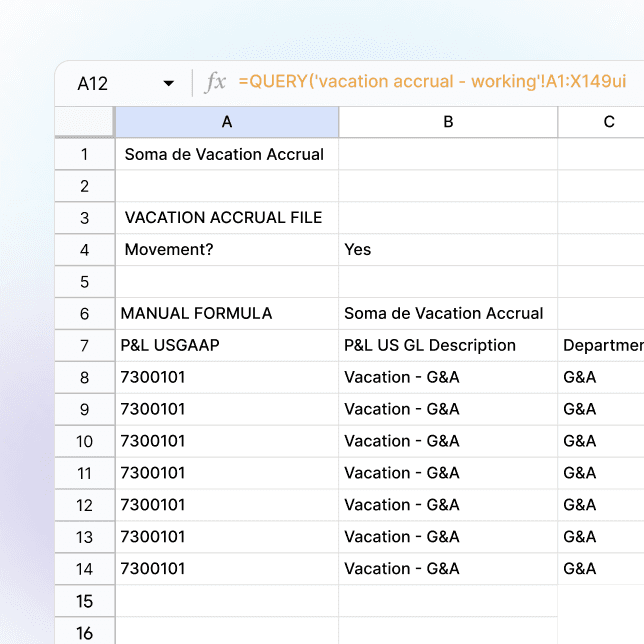
Re-performable logic
Inspect the formulas, calculations, and mappings behind every number.
Re-performable logic
Inspect the formulas, calculations, and mappings behind every number.

Complete audit trails
Every action, edit, approval, and posting is retained.
Complete audit trails
Every action, edit, approval, and posting is retained.
Journal prep that used to take days, now automated
Quarterly → Monthly
Quarterly → Monthly
Quarterly → Monthly
Quarterly → Monthly
sabbatical accruals, with 80% less prep time.
99%
of journal entries automated
12x
faster health benefit cost allocation journal entries
80%
of global open PO accruals automated

Built for the journal entries that consume your close
Built for the journal entries that consume your close
Accruals
Vendor
Payroll
PTO
Bonus
Cash & banking
Cash JEs
Transfers
Fees
Bill payments
Allocations
Department
Entity
Cost center
Intercompany
Multi-entity
Multi-currency
Eliminations
Schedules
Prepaids
Fixed assets
Amortization
Complex accounting
Stock comp
Reclasses
Reversals
Adjustments
Accruals
Vendor
Payroll
PTO
Bonus
Cash & banking
Cash JEs
Transfers
Fees
Bill payments
Allocations
Department
Entity
Cost center
Intercompany
Multi-entity
Multi-currency
Eliminations
Schedules
Prepaids
Fixed assets
Amortization
Complex accounting
Stock comp
Reclasses
Reversals
Adjustments
Built for the journal entries that consume your close
Accruals
Vendor
Payroll
PTO
Bonus
Cash & banking
Cash JEs
Transfers
Fees
Bill payments
Allocations
Department
Entity
Cost center
Intercompany
Multi-entity
Multi-currency
Eliminations
Schedules
Prepaids
Fixed assets
Amortization
Complex accounting
Stock comp
Reclasses
Reversals
Adjustments
Frequently asked questions
Frequently asked questions
Does Maxima post journal entries directly to NetSuite?
Yes. Once an entry passes your required reviews and approvals, Maxima posts it directly to NetSuite without CSV exports or manual uploads.
Does Maxima post journal entries directly to NetSuite?
Yes. Once an entry passes your required reviews and approvals, Maxima posts it directly to NetSuite without CSV exports or manual uploads.
What happens if an agent drafts a journal entry incorrectly?
Reviewers can correct or reject it before it posts, with every change logged. If source data is missing, contradictory, or outside the workflow’s rules, Max surfaces an exception rather than making an assumption.
What happens if an agent drafts a journal entry incorrectly?
Reviewers can correct or reject it before it posts, with every change logged. If source data is missing, contradictory, or outside the workflow’s rules, Max surfaces an exception rather than making an assumption.
How does Maxima ensure journal entry accuracy?
Maxima separates reasoning from deterministic execution. Agents investigate exceptions and interpret context, while calculations, mappings, validations, and posting logic run deterministically. Entries are validated for tie-outs, balanced debits and credits, cutoffs, and other accounting controls before review.
How does Maxima ensure journal entry accuracy?
Maxima separates reasoning from deterministic execution. Agents investigate exceptions and interpret context, while calculations, mappings, validations, and posting logic run deterministically. Entries are validated for tie-outs, balanced debits and credits, cutoffs, and other accounting controls before review.
What controls exist around AI-prepared journal entries?
Maxima supports explicit preparer and reviewer roles, segregation of duties, approval gates, permissions, change logs, and complete run histories. Every agent action, human edit, approval, and posting event remains part of the audit trail.
What controls exist around AI-prepared journal entries?
Maxima supports explicit preparer and reviewer roles, segregation of duties, approval gates, permissions, change logs, and complete run histories. Every agent action, human edit, approval, and posting event remains part of the audit trail.
Can I see exactly how Maxima calculated an entry?
Yes. Maxima produces supporting workpapers in Excel with formulas, schedules, mappings, and calculations intact. Reviewers can inspect and re-perform the logic behind an entry instead of relying on a black-box output.
Can I see exactly how Maxima calculated an entry?
Yes. Maxima produces supporting workpapers in Excel with formulas, schedules, mappings, and calculations intact. Reviewers can inspect and re-perform the logic behind an entry instead of relying on a black-box output.
What happens when the accounting treatment isn’t obvious?
Max follows your accounting policies and uses source context to investigate exceptions. If information is missing, conflicting, or requires judgment, Max asks for clarification or routes it to the appropriate reviewer rather than guessing.
What happens when the accounting treatment isn’t obvious?
Max follows your accounting policies and uses source context to investigate exceptions. If information is missing, conflicting, or requires judgment, Max asks for clarification or routes it to the appropriate reviewer rather than guessing.
Can I trace a journal entry back to the underlying transactions?
Yes. Maxima preserves transaction-level lineage from the journal entry through the workpaper, calculations, and underlying source data. Reviewers and auditors can trace any amount back to its source without reconstructing the work after close.
Can I trace a journal entry back to the underlying transactions?
Yes. Maxima preserves transaction-level lineage from the journal entry through the workpaper, calculations, and underlying source data. Reviewers and auditors can trace any amount back to its source without reconstructing the work after close.
Do I need to code to automate journal entry logic?
No. Accounting teams can configure mappings, calculations, source conditions, schedules, thresholds, dimensions, and posting logic without code. Max applies that logic consistently each period as new source data becomes available.
Do I need to code to automate journal entry logic?
No. Accounting teams can configure mappings, calculations, source conditions, schedules, thresholds, dimensions, and posting logic without code. Max applies that logic consistently each period as new source data becomes available.
What types of journal entries can Maxima automate?
Accruals, cash and bank entries, allocations, intercompany, prepaids and amortization, fixed assets, stock comp, reclasses, reversals, adjustments, and more. Maxima handles both repeatable entries and complex workflows requiring judgment, recalculating each from current-period source data.
What types of journal entries can Maxima automate?
Accruals, cash and bank entries, allocations, intercompany, prepaids and amortization, fixed assets, stock comp, reclasses, reversals, adjustments, and more. Maxima handles both repeatable entries and complex workflows requiring judgment, recalculating each from current-period source data.
How is this different from recurring journal entries in NetSuite?
Recurring entries repeat predefined amounts on a schedule. Maxima rebuilds each entry from current-period source data, applying your mappings, calculations, and accounting logic to determine what should actually be posted that period.
How is this different from recurring journal entries in NetSuite?
Recurring entries repeat predefined amounts on a schedule. Maxima rebuilds each entry from current-period source data, applying your mappings, calculations, and accounting logic to determine what should actually be posted that period.
How much of your journal entry process could you automate?
Explore your workflows